Let your AI assistant check it. Connect the Super MCP to Claude, ChatGPT or another assistant and paste this prompt:
Use the Super MCP to check why my custom domain [domain] is stuck on verifying DNS on my Super site [site name].
Follow the guide at https://docs.super.so/help/super-how-tos/domain-stuck-on-verifying-dns-leading-to-error-404
Tell me exactly which DNS records to fix at my domain provider.
This article explains the common reasons DNS verification can fail, including incorrect records, wrong domain placement, missing TXT records, and DNS propagation delays.
If your DNS verification fails, it’s usually due to incorrect or missing records, wrong hostnames, or changes that haven’t fully propagated yet. Properly updating these records should resolve verification errors and complete the DNS setup.
Verifying DNS may fail due to the following reasons:
- Incorrect DNS Records
- Wrong hostname, record type, or value
- Record added to the wrong domain or subdomain
- TXT Record Not Added or Not Propagated
- TXT record missing or incorrect
- DNS changes may take a few minutes to propagate
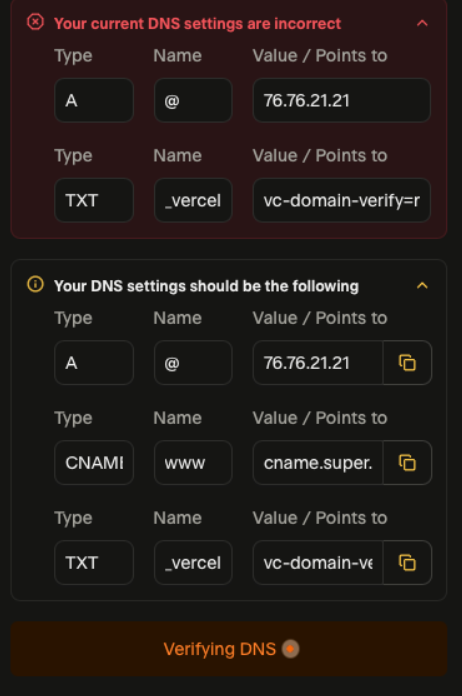
For TXT Record:
Expected Record:
https://dnschecker.org/#TXT/_vercel.yourdomain.com
Incorrect Record Example:
https://dnschecker.org/#TXT/yourdomain.com
This indicates that the hostname was entered incorrectly.
To resolve this:
- Edit the TXT record and set the hostname to _vercel. This should resolve the 404 error and complete the DNS verification.
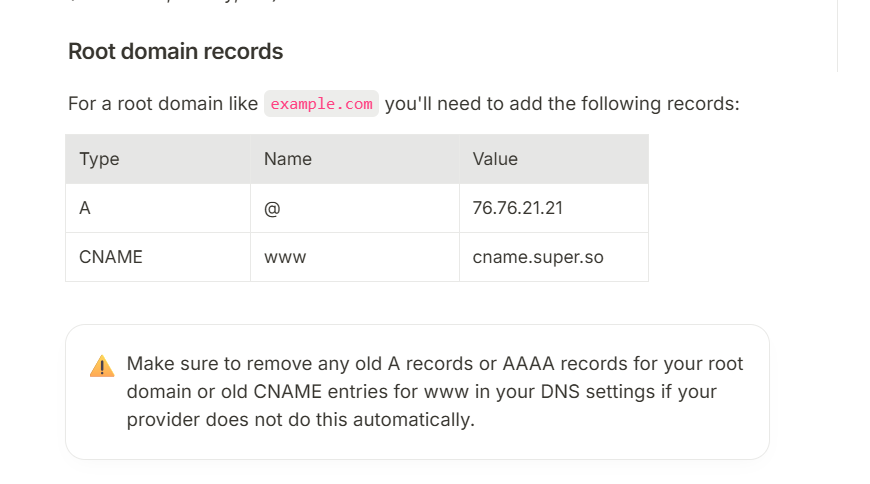
- Ensure that the correct A and CNAME records are also set as required. You can also visit this [help article](https://docs.super.so/custom-domain) for more information.