Let your AI assistant do it. Connect the Super MCP to Claude, ChatGPT or another assistant and paste this prompt:
Use the Super MCP to disable default domain indexing on my Super site [site name].
Follow the guide at https://docs.super.so/help/super-how-tos/google-search-results-showing-notion-and-super-site-pages
If a step has to be done in Notion, do it with the Notion connector or tell me exactly what to change.
Then show me the updated SEO settings.
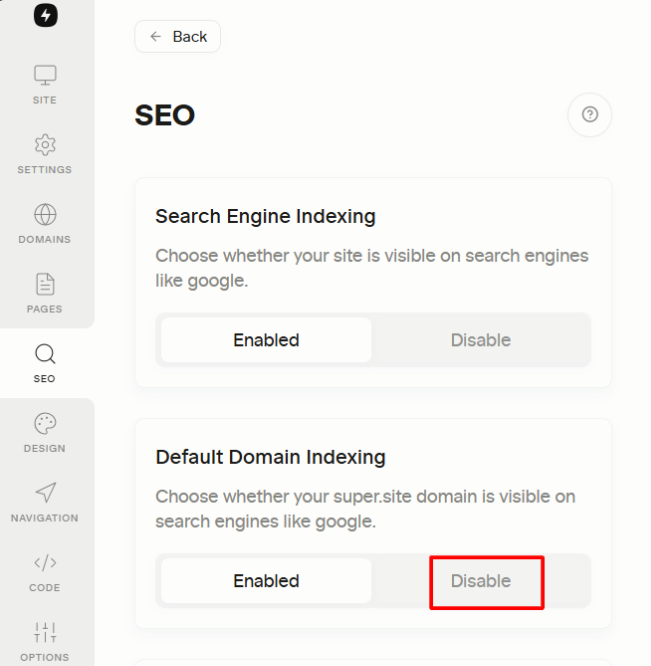
Disable SEO in Notion and Default Domain Indexing in Super to prevent your site from being indexed by search engines and control your SEO visibility
Notion pages and Super sites appearing on Google Search Results is usually caused by search engine indexing being enabled in the page’s sharing or publishing settings. When this option is turned on, Google is allowed to crawl and index the page, which makes it discoverable in search results.
To remove a page from Google Search Results, you will need to disable search engine indexing and then wait for Google to recrawl the page. Once Google detects the updated setting, the page will gradually be removed from search results. Keep in mind that this process may take some time, depending on Google’s crawl schedule.
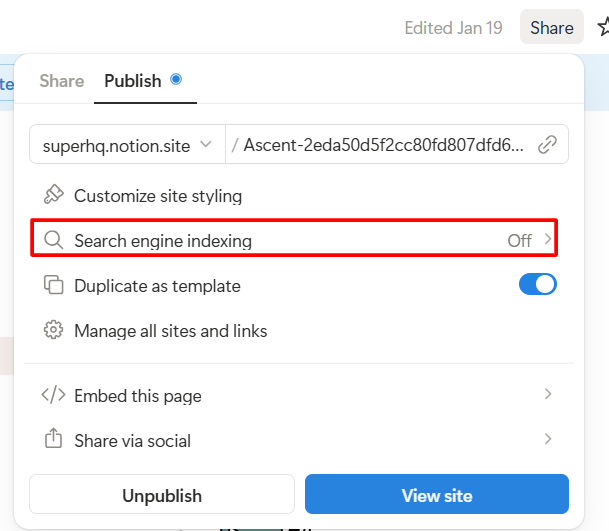
In Notion:
- Open your Notion page
- Click the Share button in the upper-right corner
- Go to the Publish tab
- Look for Search Engine Indexing
- Turn it off
In Super:
- Go to the SEO section of your Super Dashboard.
- Set Default Domain Indexing to Disabled.
- Click Save Changes.