Let your AI assistant do it. Connect the Super MCP to Claude, ChatGPT or another assistant and paste this prompt:
Use the Super MCP to update the general settings of my Super site [site name].
Follow the guide at https://docs.super.so/help/super-how-tos/manage-your-site-settings
Set the site name to [site name], the favicon to [favicon image] and the language to [language].
Then show me a preview of the home page.
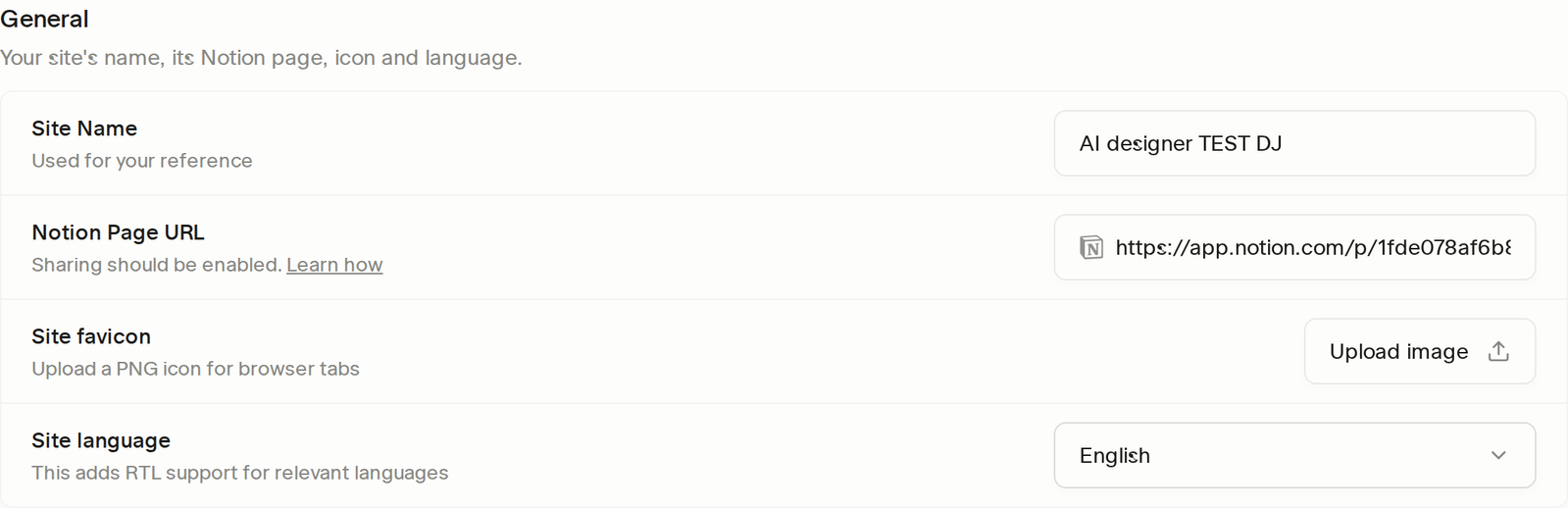
Manage your website’s essential settings, including site name, homepage URL, favicon, and language, to optimize branding, navigation, and search visibility.
In this section, you can manage the core settings of your site:
- Site Name – Set the name of your website for SEO purposes and search result titles, and to help you easily identify and manage your site within your account.
- Notion Page URL (Home Page) – Specify the Notion page that will serve as your site’s homepage. Updating this allows you to change which Notion page visitors see first when they visit your site.
- Site favicon – Upload a favicon to represent your site in browser tabs, bookmarks, and shortcuts. Using a recognizable icon helps strengthen your brand identity.
- Site language – Choose the primary language of your site. This helps browsers and search engines understand your content and improves accessibility for visitors.
These fields are in Settings → General. The same page also holds Membership, Databases, Search, Look & navigation, Privacy & access, Security and Analytics – see Settings.