


Let your AI assistant do it. Connect the Super MCP to Claude, ChatGPT or another assistant and paste this prompt:
Use the Super MCP to show only the first [number] cards of the gallery on [page] of my Super site [site name].
Follow the guide at https://docs.super.so/help/widgets-and-advanced-how-tos/how-to-limit-or-restrict-the-number-of-cards-shown-in-a-gallery-collection and keep all existing code.
Then show me a preview of that page.
This is a really good tip for showing only recent posts.
Sometimes you'd like to be able to restrict the number of items shown in the gallery collection. For example just say you want to show the six most recent blog posts from your blog database.
Here is some custom CSS to be able to do this, Add this CSS to the Code > CSS section:
.notion-collection-card:nth-child(n+7) {display: none !important;}This will hide the 7th and subsequent gallery cards. Adjust the value 7 to show more or fewer cards.
Note that this will affect all gallery collections.
How to target a specific gallery
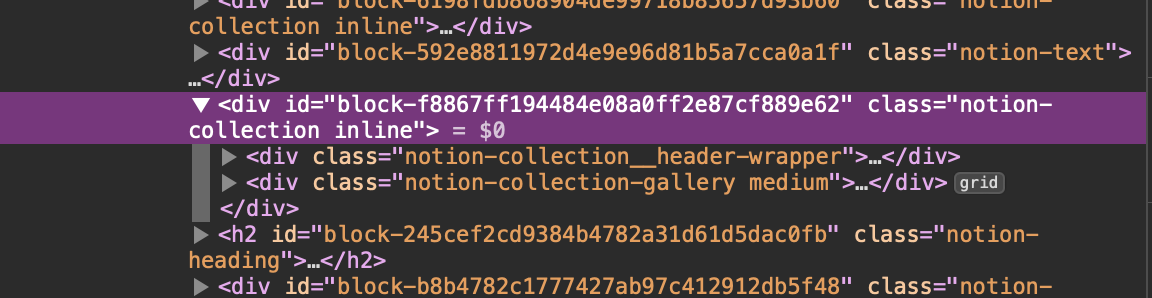
If you want to target a specific gallery then you'll need to get the block ID of the gallery by inspecting the page code.
Use the browser developer tools to inspect the code and select the gallery.
Here in this example the notion-collection has a block ID of
block-f688a3fc9cc7fbdd9c92252bbea1bb8f-super
Add the block ID to the CSS:
#block-f688a3fc9cc7fbdd9c92252bbea1bb8f-super .notion-collection-card:nth-child(n+7) { display: none !important;]