Let your AI assistant set it up. Connect the Super MCP to Claude, ChatGPT or another assistant and paste this prompt:
Use the Super MCP to set my Super site [site name] to [always dark or follow the visitor's system setting].
Follow the guide at https://docs.super.so/help/widgets-and-advanced-how-tos/how-to-set-website-to-dark-mode and keep all existing code.
Then show me a preview of the home page.
If the user has a system preference for dark mode this code will display your site in darker colors.
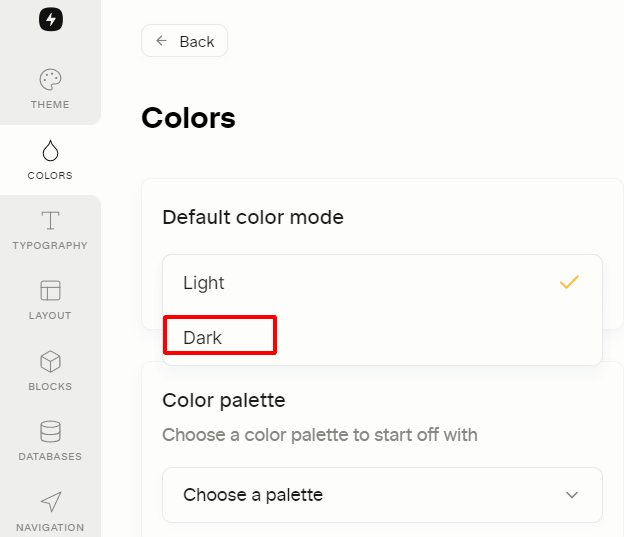
We're working hard to bring you the toggle feature for dark mode, but it's not available yet. Probably the easiest way to do this is to use the System UI mode to automatically switch to a dark mode and manually set the colors for dark mode using the following CSS: The other option would be choosing dark mode under Design Section.
@media (prefers-color-scheme: dark) { :root { --color-text-default: rgba(255, 255, 255, 0.9); --color-text-default-light: rgba(255, 255, 255, 0.9); --color-text-gray: rgba(151, 154, 155, 0.95); --color-text-brown: #937264; --color-text-orange: #ffa344; --color-text-yellow: #ffdc49; --color-text-green: #4dab9a; --color-text-blue: #529cca; --color-text-purple: #9a6dd7; --color-text-pink: #e255a1; --color-text-red: #ff7369; --color-bg-default: #2f3437; --color-bg-gray: #454b4e; --color-bg-brown: #434040; --color-bg-orange: #594a3a; --color-bg-yellow: #59563b; --color-bg-green: #354c4b; --color-bg-blue: #364954; --color-bg-purple: #443f57; --color-bg-pink: #533b4c; --color-bg-red: #594141; --color-bg-gray-light: rgba(69, 75, 78, 0.3); --color-bg-brown-light: rgba(67, 64, 64, 0.3); --color-bg-orange-light: rgba(89, 74, 58, 0.3); --color-bg-yellow-light: rgba(89, 86, 59, 0.3); --color-bg-green-light: rgba(53, 76, 75, 0.3); --color-bg-blue-light: rgba(120, 162, 187, 0.3); --color-bg-purple-light: rgba(68, 63, 87, 0.3); --color-bg-pink-light: rgba(83, 59, 76, 0.3); --color-bg-red-light: rgba(89, 65, 65, 0.3); --color-pill-default: rgba(206, 205, 202, 0.5); --color-pill-gray: rgba(151, 154, 155, 0.5); --color-pill-brown: rgba(147, 114, 100, 0.5); --color-pill-orange: rgba(255, 163, 68, 0.5); --color-pill-yellow: rgba(255, 220, 73, 0.5); --color-pill-green: rgba(77, 171, 154, 0.5); --color-pill-blue: rgba(82, 156, 202, 0.5); --color-pill-purple: rgba(154, 109, 215, 0.5); --color-pill-pink: rgba(226, 85, 161, 0.5); --color-pill-red: rgba(255, 115, 105, 0.5); --color-ui-hover-bg: rgb(71, 76, 80); --color-ui-hover-bg-light: rgb(71, 76, 80); --color-card-bg: #2f3437; --colorThe other option would be choosing dark mode under Design Section.