Let your AI assistant walk you through it. Connect the Super MCP to Claude, ChatGPT or another assistant and paste this prompt:
Use the Super MCP to list my Super sites and their plans.
Read https://docs.super.so/help/billing/why-you-see-double-charges-on-your-superso-invoice and explain step by step why my last invoice shows [the charge you see].
Do not change any plan or billing; only show me where to manage it in the dashboard.
Prorated charges for mid-cycle site upgrades combined with your current month’s renewal, ensuring all sites align to a single billing date.
You may have noticed that you were charged twice. Please note that Super has a single renewal date for all active sites.
If you add a new active site in the middle of your billing cycle, you will not be charged immediately for the full month. Instead, a prorated amount for the remainder of the current month will be applied, and the full charge for the new site will be included in your next renewal.
This ensures that all your sites align to the same renewal date and prevents overlapping billing for partial months.
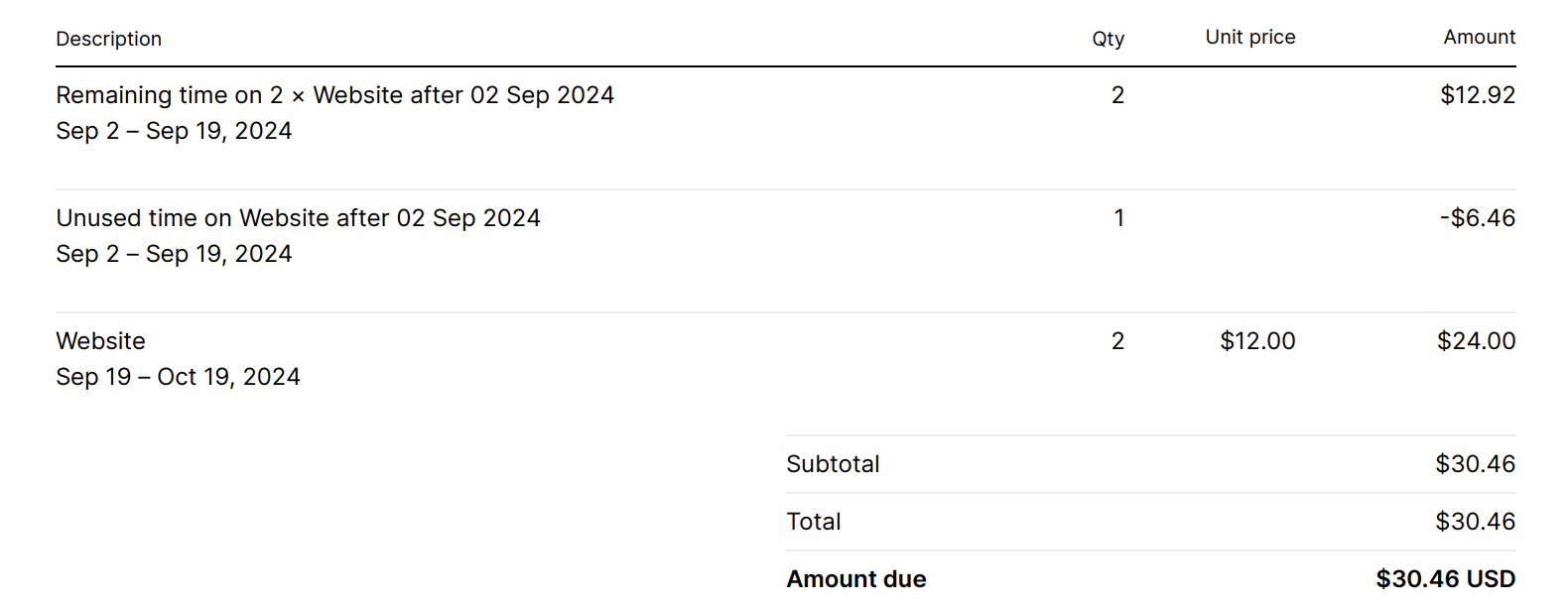
This is how it looks like on the invoice:
On the invoice, this is reflected as the prorated charge for the remaining time from last month’s second site upgrade, combined with the renewal fee for the current billing cycle.